How to connect GA4 to BigQuery (and what it actually costs)
By Motabar Javaid · · 4 min read · Updated
Short answer: Create a Google Cloud project with BigQuery enabled, then in GA4 go to Admin, Product links, BigQuery links, choose your project and a data location, and pick daily and/or streaming export. Linking is free. Small and mid sized sites often stay within or close to BigQuery's free tier of 10 GB storage and 1 TB of queries a month. The one thing to know before you start: the export can't be backfilled, so it only contains data from the day you link it.
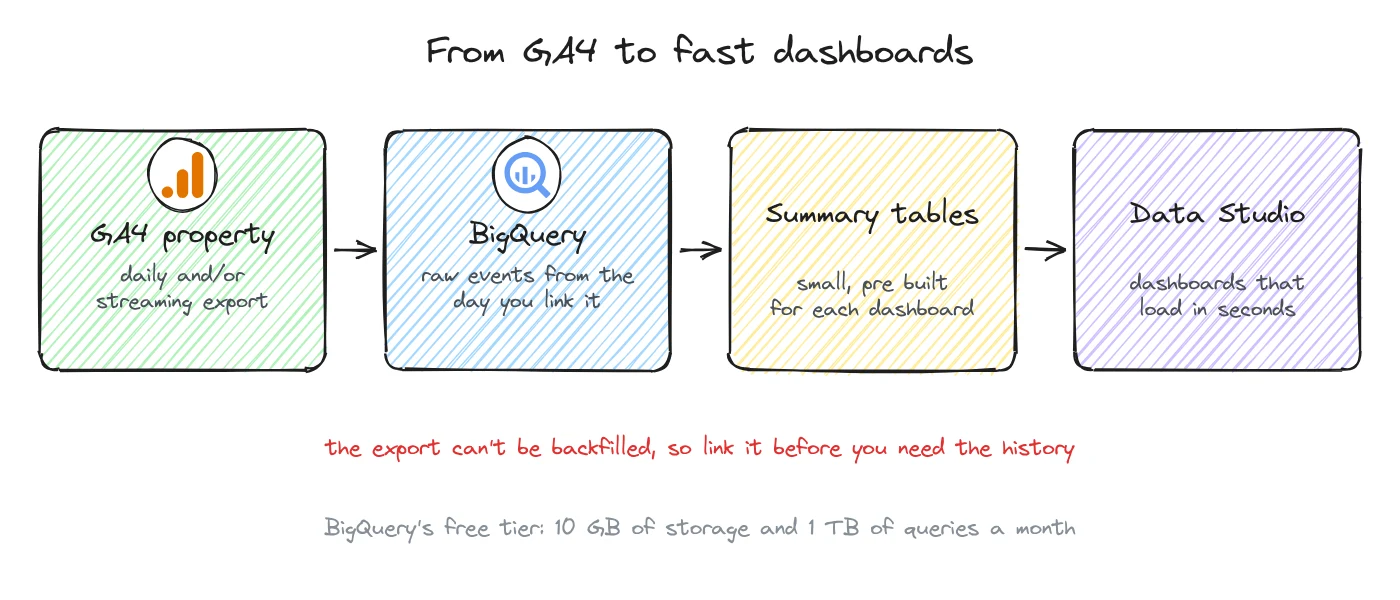
That last point is why I tell every client to switch it on now, even if they won't use it for months.
Why bother with BigQuery?
The GA4 interface is fine for everyday reporting, but BigQuery gives you:
- Every raw event, unsampled. No thresholds, no (other) rows, no sampling in big date ranges.
- Your data for as long as you want. GA4's interface limits detailed data to 14 months at most.
- The ability to join GA4 with everything else: ad spend, CRM deals, Search Console, refunds. That's where real attribution and ROAS reporting comes from.
Step 1: Set up a Google Cloud project
- Go to the Google Cloud console and create a project (or use an existing one).
- Enable the BigQuery API.
- To keep data longer than 60 days, attach a billing account. Without one you're in the BigQuery sandbox, which is free but deletes tables after 60 days.
You can start in the sandbox to try it, but for a real setup, add billing. The free tier still applies, so you won't necessarily pay anything.
Step 2: Link GA4
- In GA4, go to Admin, Product links, BigQuery links, and click Link.
- Choose your Cloud project.
- Choose a data location, like US or EU. You can't change it later, so pick the one that matches where the rest of your data lives.
- Choose the export type:
- Daily: one complete table per day. Standard GA4 properties can export up to 1 million events per day this way.
- Streaming: events arrive within minutes. Useful for near real time dashboards, but streaming inserts cost extra.
- Submit. Data starts arriving the next day.
What you'll see
GA4 creates a dataset called analytics_ followed by your property ID. Inside it:
events_YYYYMMDD: one table per day with every eventevents_intraday_YYYYMMDD: today's data, if streaming is on
Each row is one event, with nested fields for event parameters, user properties, device, geography and traffic source. It's not a friendly table to query directly. Most of the work is turning it into clean session and conversion tables. My guide to GA4 sessions and source / medium in BigQuery SQL shows how.
What does it cost?
Three possible costs:
- Storage: the first 10 GB per month are free. A small site might use well under 1 GB a month.
- Queries: the first 1 TB of data scanned per month is free. Badly written queries that scan every column of every day burn through this fast. Select only the columns and dates you need.
- Streaming export: charged per amount of data streamed. Skip it unless you need data within minutes.
For most small and mid sized businesses with sensible queries, the monthly bill is zero or a few dollars. Costs grow mainly with heavy dashboards that query raw tables directly. Building small summary tables for dashboards fixes that, and keeps Data Studio (formerly Looker Studio) dashboards fast too.
Common mistakes
- Waiting to link it. Every day you wait is data you'll never have in BigQuery.
- Picking the wrong data location. You can't move it later without starting over.
- Using
traffic_sourcefor session attribution. That field holds the user's first source, not the session's. It's the most common error in GA4 BigQuery queries. - Expecting an exact match with the GA4 interface. BigQuery has raw events without GA4's modelling. See why GA4 shows different numbers in different places.
If you want a warehouse that ties GA4 to ad spend and CRM revenue, my marketing analytics consulting does exactly that, and the single source of truth case study shows what it looks like.
Frequently asked questions
Is the GA4 BigQuery export free?
Linking is free for all GA4 properties. You pay for BigQuery storage and queries above the free tier of 10 GB storage and 1 TB of queries per month, and for streaming export if you turn it on.
Can I get historical GA4 data into BigQuery?
No. The export starts from the day you link it. Historical data can only be pulled in summary form through the GA4 Data API.
What's the difference between daily and streaming export?
Daily export writes one complete table per day. Streaming export sends events within minutes, but costs extra and is only needed for near real time reporting.