Why your Black Friday numbers keep changing for days (and which to trust when)
By Motabar Javaid · · 5 min read
Short answer: Every platform reports Black Friday late. GA4 can take 24 to 48 hours to process data, and changes it while it does. Google Ads credits each sale to the day of the ad click, so Friday keeps gaining conversions for days or weeks as late buyers come back. Meta adds conversions that happen after the ad and some estimated ones, and doesn't publish when its numbers settle. On the day, trust your store's orders. Judge the platforms on Monday or Tuesday, and don't change bids or budgets on same day return on ad spend.
Black Friday falls on November 27 this year, and Cyber Monday on November 30. Those are the days when people make the fastest decisions with the least complete numbers: pausing a campaign that "isn't working" at 3pm, or pushing budget into one that looks amazing before the late sales from other channels have landed.
Why do the numbers keep changing?
Because no platform reports a sale the moment it happens, and each one waits for a different reason:
| Platform | Why its numbers move | What Google or Meta say |
|---|---|---|
| GA4 | Data is still processing | Google says processing can take 24 to 48 hours, and report data can change during that time |
| Google Ads | Sales are dated to the ad click | Standard conversion columns use the date of the ad interaction, so recent days look worse until late conversions arrive |
| Meta | Conversions within your attribution window, plus some estimates | Meta doesn't publish a fixed time for its numbers to settle |
None of this means the tracking is broken. It means a number from Friday afternoon isn't finished yet.
How long does GA4 take to settle?
Google's own figures:
- The Realtime report shows events within about a minute, so it's useful for checking purchases are arriving at all.
- Standard reports can take 24 to 48 hours to process, and the numbers can change during that time.
- Attribution of key events can keep changing for up to 12 days, so which channel gets credit for a Black Friday sale can still shift into December.
- Events that arrive more than 72 hours late are ignored. That matters if you send purchases from a server or another system: anything delayed beyond three days never reaches GA4.
So on Friday, use Realtime to confirm purchases are flowing, not to judge channels. Look at Friday's standard reports on Sunday at the earliest.
Why does Google Ads keep adding Black Friday sales afterwards?
Google Ads' standard conversion columns credit a sale to the day of the ad click, not the day of the purchase. Someone who clicks on Black Friday and buys the following Wednesday adds a conversion to Friday the following Wednesday.
That's why the most recent days always look worse in Google Ads: their late conversions haven't happened yet. How far back sales can be added depends on the conversion window you set for each conversion action, which Google lets you set anywhere from 1 to 90 days, with 30 days as the default.
Two things help:
- The "by conversion time" columns date each conversion to when it actually happened, which is easier to compare with your store.
- The "Days to conversion" segment shows how long your customers usually take, so you know how long to wait before judging a day.
Smart Bidding already allows for this delay. Google shows conversion delay estimates in bid strategy reports for exactly this reason, which is one more reason not to override it on Black Friday afternoon.
And Meta?
Meta counts conversions that happen within your attribution setting after someone clicks or views an ad, so a sale on Monday can still be credited to Friday's ad. Some of its reported conversions are also modelled estimates rather than individually observed sales.
Meta doesn't publish a fixed time for its numbers to settle, and figures quoted online vary. The safe approach is the same as Google Ads: give it a few days before you read Black Friday's results. If you changed your attribution setting this year, remember that comparisons with last year won't be like for like. My guide on why Meta, Google Ads and GA4 conversions don't match explains the different counting rules.
Which number should you trust on which day?
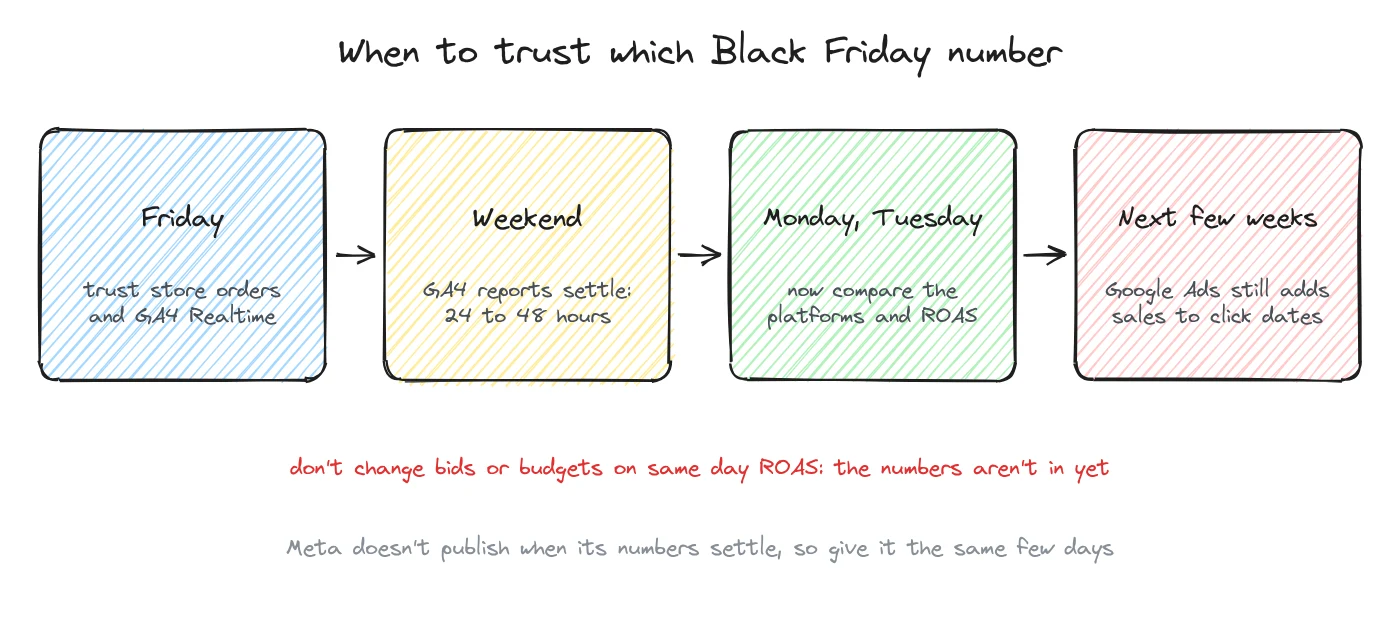
- Black Friday itself: your store's orders and revenue, from Shopify, WooCommerce or your backend. They're the only numbers that are complete in real time. Use GA4 Realtime only to confirm tracking is working.
- The weekend: GA4's standard reports for Friday fill in. Still too early to judge ad platforms.
- Monday or Tuesday: compare platforms, channels and return on ad spend for Friday and the weekend.
- The following weeks: Google Ads, and to a lesser extent Meta, keep crediting late sales to Black Friday clicks. Check again in December before you write the final report.
Before any of this, make sure GA4 is recording every order in the first place. My guide on checking GA4 is recording all your orders has the weekly check and the pre peak lockdown.
What should you avoid doing on Black Friday?
- Pausing campaigns on same day return on ad spend. Friday's numbers are the least complete they'll ever be.
- Comparing platforms with each other on the day. They're all at different stages of catching up.
- Changing tracking. No new pixels, apps or consent banner changes until after Cyber Monday.
- Reading year on year comparisons without context. If your tracking, consent setup or attribution settings changed since last year, the comparison is skewed before you start.
For the longer term fix, sending real orders back to the ad platforms makes their numbers less dependent on browser tracking. That's covered in sending CRM sales back to Google Ads and Meta. If you'd like a second pair of eyes on your setup before the peak, my GA4 audit and repair service covers it.
Frequently asked questions
Why are my Black Friday sales in Google Ads still going up a week later?
Because Google Ads credits each conversion to the day of the ad click. People who clicked on Black Friday and bought later are added to Friday as they convert, up to the end of your conversion window.
How long does GA4 take to show Black Friday data?
The Realtime report shows events within about a minute. Standard reports can take 24 to 48 hours to process, and Google says the data can change during that time.
When should I judge my Black Friday ad performance?
On Monday or Tuesday at the earliest, using your store's orders as the baseline. Check Google Ads and Meta again a few weeks later, because both keep crediting late sales back to Black Friday.