How to see ChatGPT and other AI assistant traffic in GA4
By Motabar Javaid · · 5 min read
Short answer: Since May 13, 2026, GA4 has a default channel called AI Assistant. When someone clicks through to your site from an assistant like ChatGPT, Gemini, Copilot or Grok, and GA4 recognises the referrer, it sets the medium to ai-assistant and the visit lands in that channel. Open Reports, Acquisition, Traffic acquisition to see it. It doesn't include Google's AI Overviews or AI Mode, and visits that arrive without a referrer still end up in Direct.
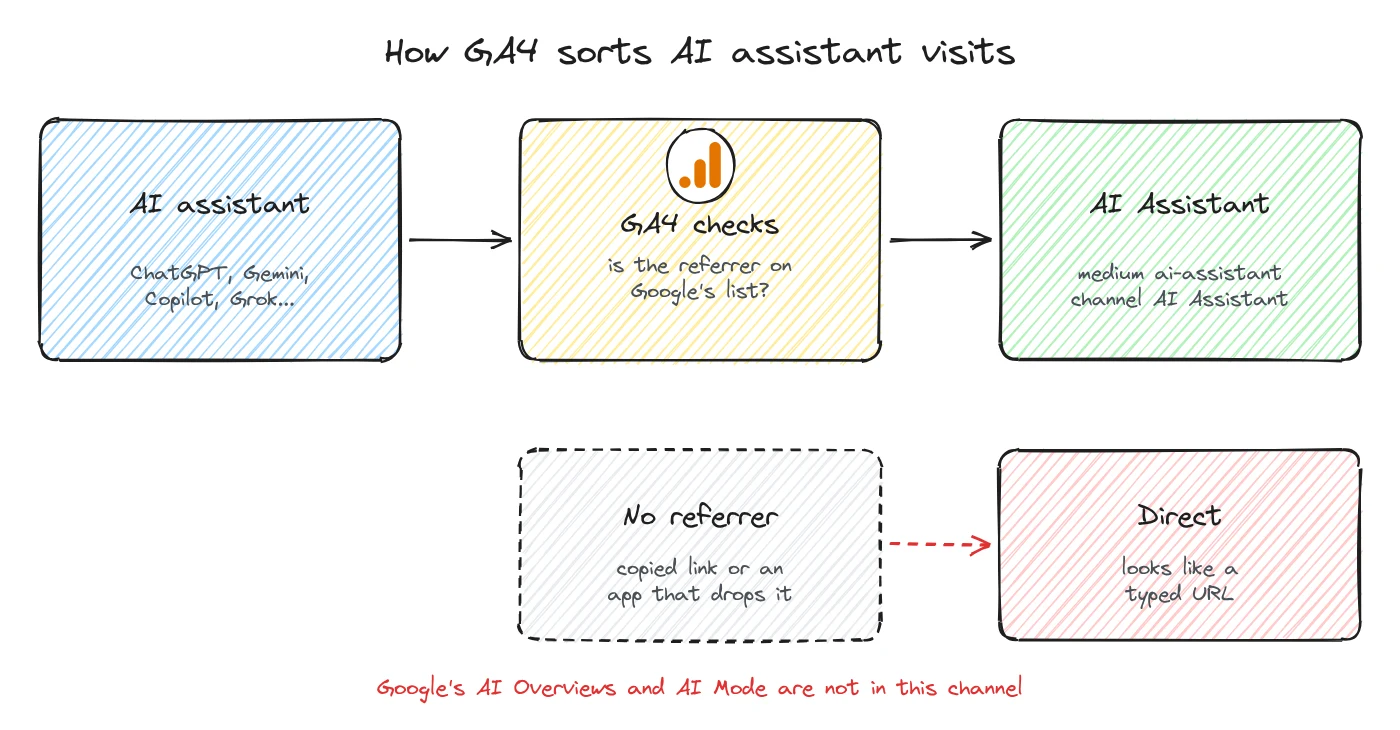
"How much traffic are we getting from ChatGPT?" has become a normal question in marketing meetings. Until this year the honest answer in GA4 was "some of it is in Referral, some of it is in Direct, and we can't be sure". The new channel makes the first part a lot easier.
What is the AI Assistant channel in GA4?
It's one of the channels in GA4's default channel group, the built in set of rules that sorts every visit into Organic Search, Paid Search, Email, Referral and so on.
Google's default channel group help page describes it as the channel for users who arrive from sources like ChatGPT, Gemini, Deepseek, Copilot or Grok, and says it excludes Google's AI Overviews and AI Mode. Google's May 13, 2026 release note names ChatGPT, Gemini and Claude as examples.
Here's how the rule works:
| What GA4 does | Value |
|---|---|
| Referrer matches Google's list of AI assistants | Medium is set to ai-assistant |
| Campaign for those visits | (ai-assistant) |
| Channel | AI Assistant (medium exactly matches ai-assistant) |
Google hasn't published the full list of assistants it recognises. So treat the names above as examples, not a complete list.
Where to find AI assistant traffic in GA4
- Go to Reports, Acquisition, Traffic acquisition.
- Make sure the primary dimension is Session default channel group. Look for the AI Assistant row.
- To see which assistants send traffic, click the plus next to the dimension and add Session source. You'll see the assistant's site, such as
chatgpt.com, next to the channel. - Pick your main key event in the key events column to see whether these visitors actually convert, not just whether they turn up.
For a deeper look, build a free form exploration with Landing page and Session source as dimensions, filtered to Session medium exactly matches ai-assistant. That shows which of your pages AI assistants are actually sending people to, which is often a surprise.
One thing to keep in mind when you compare periods: the channel started on May 13, 2026. Before that, the same visits usually showed up as Referral with the assistant as the source. A jump in AI Assistant traffic around May 2026 is the new rule, not a sudden change in behaviour.
What AI traffic does GA4 still miss?
The channel only sees visits where GA4 can tell an assistant sent them. Three kinds slip through:
- Google's AI Overviews and AI Mode. Google says these are excluded from the AI Assistant channel, so clicks from them won't show up here.
- Visits with no referrer. If someone copies a link out of a chat and pastes it into their browser, or an app doesn't pass the referrer, GA4 has nothing to go on and the visit lands in Direct. My guide on why GA4 direct traffic is so high covers this and the other causes.
- Assistants that aren't on Google's list. Those still arrive like any other website that links to you, so they show up as Referral. Check your Referral sources now and then for AI tools that GA4 hasn't picked up yet.
So read the AI Assistant number as a floor, not the full total.
Can I add other AI tools to the channel?
Not to the default channel group. Google doesn't let you edit it. What you can do is create a custom channel group under Admin, Data display, Channel groups. Copy the default group, then add a rule that sends the sources you care about into your own AI channel.
The same approach fixes visits landing in Unassigned, which I explain in Unassigned and (not set) traffic in GA4. If you share your own links in places where AI tools pick them up, tagging them consistently helps too. My UTM naming conventions guide has a simple scheme.
Should AI assistant traffic change how you judge your marketing?
It's worth watching, but don't over read small numbers. A handful of sessions a week from ChatGPT says more about which pages are useful than about a new channel to budget for.
What it does change is how you read the other channels. If Organic Search is flat while AI Assistant grows, some people who used to search may now be asking an assistant instead. And because attribution gives credit across the path to a conversion, an AI visit early on can get some of the credit for a sale later. GA4 attribution models explained covers how that works.
If you want a second pair of eyes on how your channels are set up, including custom channel groups for AI traffic, that's part of my GA4 audit and repair service.
Frequently asked questions
Does GA4 track traffic from ChatGPT?
Yes. Since May 13, 2026, visits that GA4 recognises as coming from ChatGPT and other AI assistants get the medium ai-assistant and appear in the AI Assistant channel under Reports, Acquisition, Traffic acquisition.
Why is my AI Assistant channel empty or so small?
Either few people reach your site from AI assistants yet, or their visits arrive without a referrer and land in Direct. Assistants that aren't on Google's list show up as Referral instead. Check both before deciding AI sends you nothing.
Does the AI Assistant channel include Google AI Overviews?
No. Google says the channel excludes AI Overviews and AI Mode, so clicks from Google's own AI features won't appear in it.