Google tag and Tag Manager changes in 2026: what to do with your container
By Motabar Javaid · · 5 min read
Short answer: Between October and November 2026 Google folded the Google tag into Google Tag Manager. Containers can now send data to GA4 and Google Ads directly through destination tags, without loading the extra gtag.js script, and every Google tag is becoming a Tag Manager container. Nothing is changed for you automatically, and optimizing is optional. But do check two things now: wildcard custom event triggers, which can start firing on new gtag.config events, and any unsupported installation, which gets upgraded in January 2027.
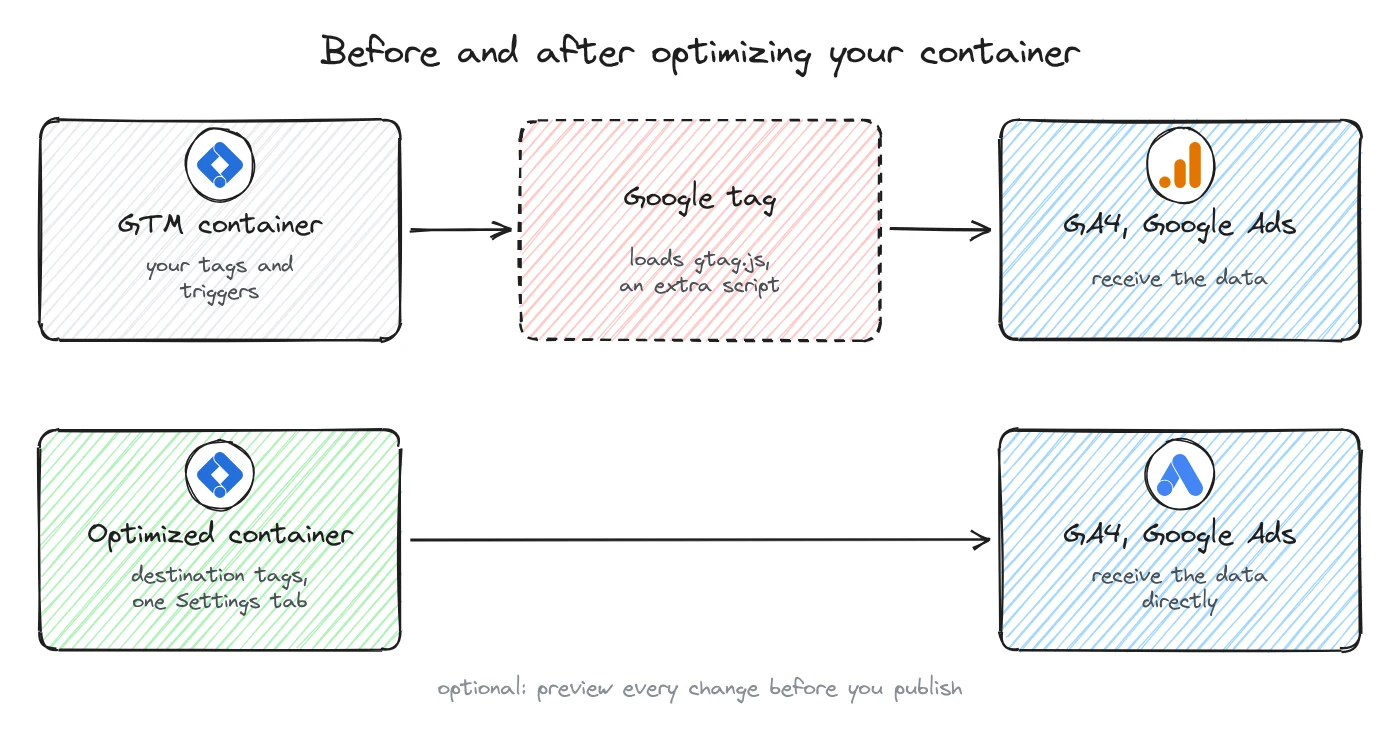
If you've opened Tag Manager lately and seen a banner asking you to optimize your container, a new Settings tab, or Triggers and Variables tucked under "Advanced", this is why. Google announced the plan in August and rolled it out in three steps through the autumn.
What changed, and when?
Everything below comes from Google's Tag Manager release notes and its explainer, Updates to Google tag and Google Tag Manager.
| Date | Change | What it means for you |
|---|---|---|
| Oct 8, 2026 | gtag('config') behaviour standardized |
GTM containers now start on container load, whatever config commands your site runs. Those commands now appear in the data layer as gtag.config events |
| Oct 12, 2026 | Destination tags | A container can send data straight to GA4, Google Ads, Floodlight and Merchant Center, without loading gtag.js first |
| Nov 17, 2026 | Google tag and Tag Manager unification | Every Google tag becomes a Tag Manager container. Sites that only use the Google tag get Tag Manager's interface, debugging and version control. What the tag does on the page doesn't change |
Two smaller details from the Nov 17 notes are worth knowing. New install snippets are now all the same and no longer include the gtag config command. And access to data in Tag Assistant is now managed through your Tag Manager container permissions.
Do I have to do anything?
Mostly no, but two checks are worth ten minutes:
- Wildcard custom event triggers. Since Oct 8, config commands show up as
gtag.configevents in the data layer. Google warns that if your container uses a custom event trigger that matches any event name, those tags may now fire on them too. Open GTM, look for custom event triggers using a regex like.*, and narrow them down. My guide to debugging GTM tags in Preview mode shows how to spot a tag firing on the wrong event. - Unsupported installations. If your Google tag or container is loaded in a way Google doesn't support, the Nov 17 notes say you'll get the upgrade in January 2027 and should adjust your setup before then. Google's July 2026 notes name paths like
/gtag/jsand/gtag/destinationas unsupported ways to load a container. If someone "creatively" installed your tags years ago, check now.
If your site only uses Tag Manager with standard snippets, everything keeps working as it did.
Should you optimize your container?
Google recommends it, and says no changes are made automatically. If you have edit, approve or publish permission, you start it from the optimization banner and can preview every change before it's published.
What you get, according to Google:
- Less JavaScript on the page. The container sends data directly instead of loading gtag.js, which Google says could add latency.
- One place for settings. Your Google tag settings move into a new Settings tab, with a map of the Google destinations they apply to. Your event tags stay as they are.
- Linked accounts. Optimizing links the container to your Google destination accounts, with Read access granted by default. You can change that in Tag Manager's user management.
My take: for most containers, optimize, but do it like any other release. Run it in a workspace, check the preview, test in Preview mode, then publish. Two things to look out for:
- Page views. Google's help says adding a destination tag automatically sends a page view for that destination. If you also fire your own GA4
page_viewevent tag, check you're not now counting page views twice. - Leftover Google tags. If your container still loads an intermediary Google tag, Google says the new Settings tab doesn't apply to it, and you have to update that tag's settings separately. Clean those up so settings live in one place.
What if my site only uses the Google tag?
Then the Nov 17 change gives you an option rather than a job. Your gtag.js installation keeps working exactly as before, and you can now use Tag Manager features like version control and debugging on it. If you've been putting off moving to Tag Manager, this makes it easier. If you're happy with the setup, nothing forces you to change.
Does this affect server side tracking?
Not directly. These are browser side changes. Sending data to a server container is still a configuration setting (server_container_url) on the Google tag, as Google's destination docs show. If you're weighing up server side tracking anyway, start with is server side tracking worth it.
A good moment for a container clean up
Any change that touches every tag is a good excuse to look at the whole container: old tags, duplicate GA4 installs, triggers nobody understands. My GTM container audit checklist walks through it, and the 2027 tracking checklist covers the rest of the setup. If you'd rather have someone optimize and test it for you, that's part of my Google Tag Manager implementation work.
Frequently asked questions
Do I have to optimize my Google Tag Manager container?
No. Google recommends it but says no changes are made automatically. You start it from the banner in Tag Manager and can preview every change before publishing.
What are destination tags in Google Tag Manager?
Tags that connect your container to a Google destination, like a GA4 web data stream or a Google Ads account, and send data to it directly instead of loading gtag.js first. Adding one also sends a page view for that destination automatically.
Why are my GTM tags firing on gtag.config events?
Since Oct 8, 2026, config commands appear in the data layer as gtag.config events. Custom event triggers that match any event name can now fire on them. Narrow those triggers to the event names you actually mean.