How to track HubSpot form submissions in GA4
By Motabar Javaid · · 5 min read
Short answer: GTM's built in form trigger doesn't reliably catch HubSpot forms, because HubSpot submits them with its own JavaScript. Instead, listen for the success event HubSpot itself announces: onFormSubmitted for forms built in HubSpot's legacy form editor, and hs-form-event:on-submission:success for forms built in the updated editor. Push it into the data layer from one GTM tag, send a generate_lead event to GA4, and mark it as a key event.
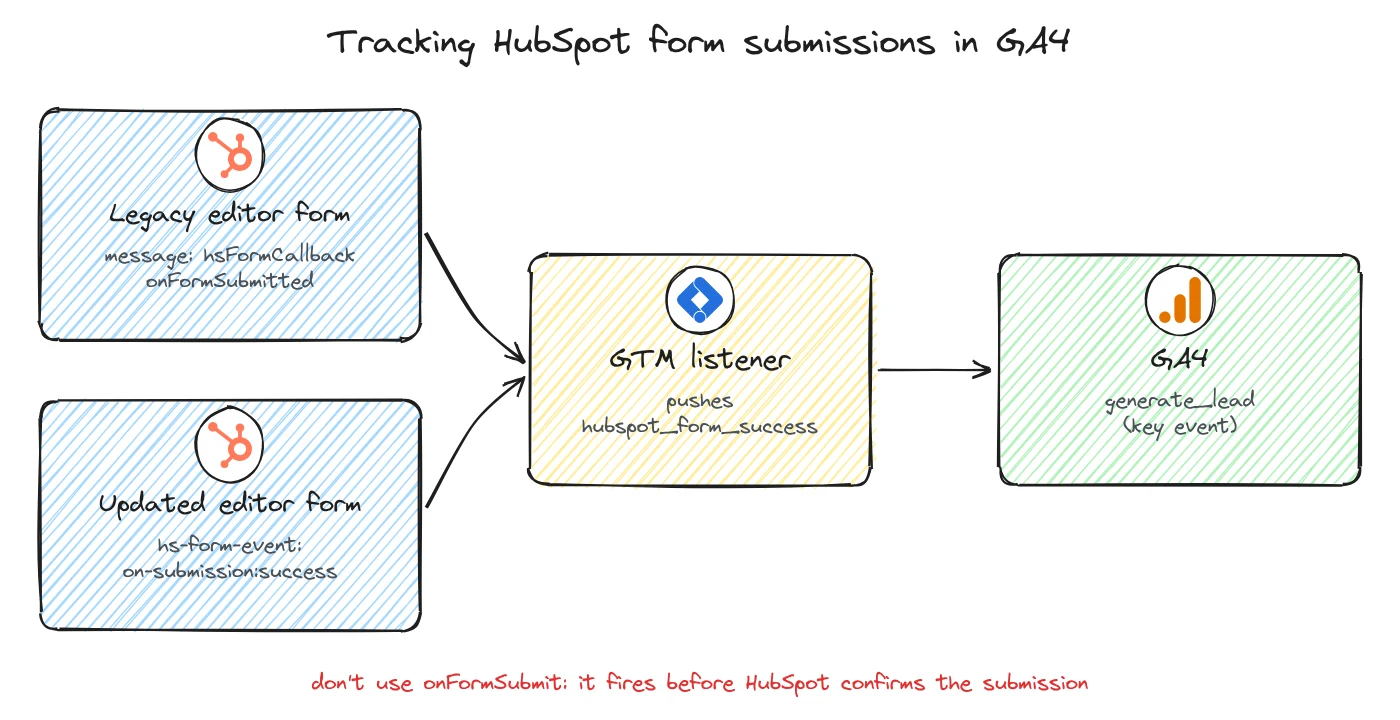
HubSpot already records the submission and the contact. The reason to also send it to GA4 is everything HubSpot can't see: which campaigns, pages and channels in GA4 lead to forms, and a conversion you can import into Google Ads.
Why doesn't GTM's form trigger work with HubSpot forms?
GTM's Form Submission trigger listens for the browser's normal form submit. HubSpot's embedded forms handle the submission themselves in JavaScript, so that browser event doesn't happen the way GTM expects. On sites where the form loads inside an iframe, GTM can't see it at all.
Click triggers on the submit button are worse: they fire when someone clicks with an empty required field or an invalid email, so you count failed attempts as leads.
HubSpot solves this by announcing a successful submission to the page. You just need to listen for it.
Which kind of HubSpot form do you have?
HubSpot has two form editors, and they announce success differently:
| Form type | Success event | Where it's documented |
|---|---|---|
| Legacy form editor | A message with type hsFormCallback and event name onFormSubmitted |
HubSpot's legacy forms developer docs |
| Updated form editor | A window event called hs-form-event:on-submission:success |
HubSpot's global form events docs |
You don't need to know which one you have. The listener below handles both, so tracking keeps working even if a form is rebuilt in the other editor later.
For legacy forms, HubSpot also sends onFormSubmit. Don't use that one for tracking: it fires as the form starts submitting, before HubSpot has confirmed it, and HubSpot recommends onFormSubmitted for anything that should happen after a successful submission.
How to send HubSpot form submissions to GA4 with GTM
Step 1: Add one listener tag
In GTM, create a Custom HTML tag with this code and fire it on All Pages:
<script>
  window.dataLayer = window.dataLayer || [];

  // Forms built in HubSpot's legacy form editor
  window.addEventListener('message', function (e) {
    if (e.data && e.data.type === 'hsFormCallback' && e.data.eventName === 'onFormSubmitted') {
      window.dataLayer.push({
        event: 'hubspot_form_success',
        form_id: e.data.id,
        form_editor: 'legacy'
      });
    }
  });

  // Forms built in HubSpot's updated form editor
  window.addEventListener('hs-form-event:on-submission:success', function () {
    window.dataLayer.push({
      event: 'hubspot_form_success',
      form_editor: 'updated'
    });
  });
</script>
The listener only has to be on the page before someone submits, so All Pages is enough. If the data layer is new to you, my guide on what a data layer is explains why this is more reliable than watching for a thank you message.
Step 2: Create the trigger and variables
- Trigger: a Custom Event trigger with the event name
hubspot_form_success. - Variables: Data Layer Variables for
form_idandform_editor.
Step 3: Send the GA4 event
Create a GA4 Event tag named generate_lead, fired by that trigger. Add form_id as a parameter if you have several forms and want to tell them apart, and register it as a custom dimension in GA4 to report on it.
Mark generate_lead as a key event and count it once per session. My guide to setting up key events in GA4 covers both.
Step 4: Add your ad platforms
Fire your Google Ads conversion tag and Meta's Lead event from the same trigger, so every platform counts the same thing.
How do I avoid counting HubSpot leads twice?
The usual causes of double counting:
- A thank you page and the event. If the form also redirects to a thank you page that fires its own conversion, every lead counts twice. Pick one.
- GA4's automatic form tracking. Enhanced measurement's form interactions can send
form_submitfor the same form. Make sure onlygenerate_leadis a key event, or switch form interactions off. - Two listeners. An older tag from a previous setup, plus this one. Check GTM for any other tag listening to
hsFormCallback.
The same rules apply to every form tool. My guide on tracking Elementor and WordPress form submissions covers the other common plugins.
How to test it
- Open GTM Preview mode on a page with the form.
- Submit it with an invalid email. Nothing should fire.
- Submit it properly. You should see one
hubspot_form_successevent and your GA4 tag firing once. - Check GA4 DebugView for
generate_lead, then delete the test contact in HubSpot.
If nothing fires, your form may be a different type than you expected. Add a temporary console.log inside each listener, submit again, and see which one runs. My guide to debugging GTM tags walks through Preview mode.
Don't forget the source in HubSpot
Tracking the submission in GA4 doesn't fix the source HubSpot stores on the contact. If your contacts show up as Offline Sources, read why HubSpot shows Offline Sources. If you want UTMs saved on every lead, see capturing UTM parameters in forms. And if HubSpot and GA4 credit the same lead to different sources, this is why.
If you'd like this set up and tested across your forms and ad platforms, it's part of my Google Tag Manager implementation work.
Frequently asked questions
Can Google Tag Manager track HubSpot form submissions?
Yes, but not with the built in form trigger. Listen for HubSpot's own success event, onFormSubmitted for legacy forms or hs-form-event:on-submission:success for forms from the updated editor, and push it to the data layer.
What's the difference between onFormSubmit and onFormSubmitted in HubSpot?
onFormSubmit fires as the form starts submitting, before HubSpot confirms it. onFormSubmitted fires after the submission succeeded, so it's the one to use for conversion tracking.
Why did my HubSpot form tracking stop working?
Often because the form was rebuilt in HubSpot's updated form editor, which uses a different success event than legacy forms. Listen for both events, as in the code above, so tracking survives the switch.