Why HubSpot and GA4 show different sources for the same lead
By Motabar Javaid · · 5 min read
Short answer: HubSpot and GA4 answer different questions. HubSpot's Original Traffic Source records the first known web source for a contact and keeps it, so a lead who first found you on Google and later clicked an ad stays "Organic search". GA4 reports each session by its own source and shares the credit for a conversion across touchpoints with its attribution model, so the same lead can show up as "Paid search". They also define sessions, sources and channels differently. Use HubSpot for first touch on leads and deals, GA4 for channel performance, and line them up with consistent UTMs.
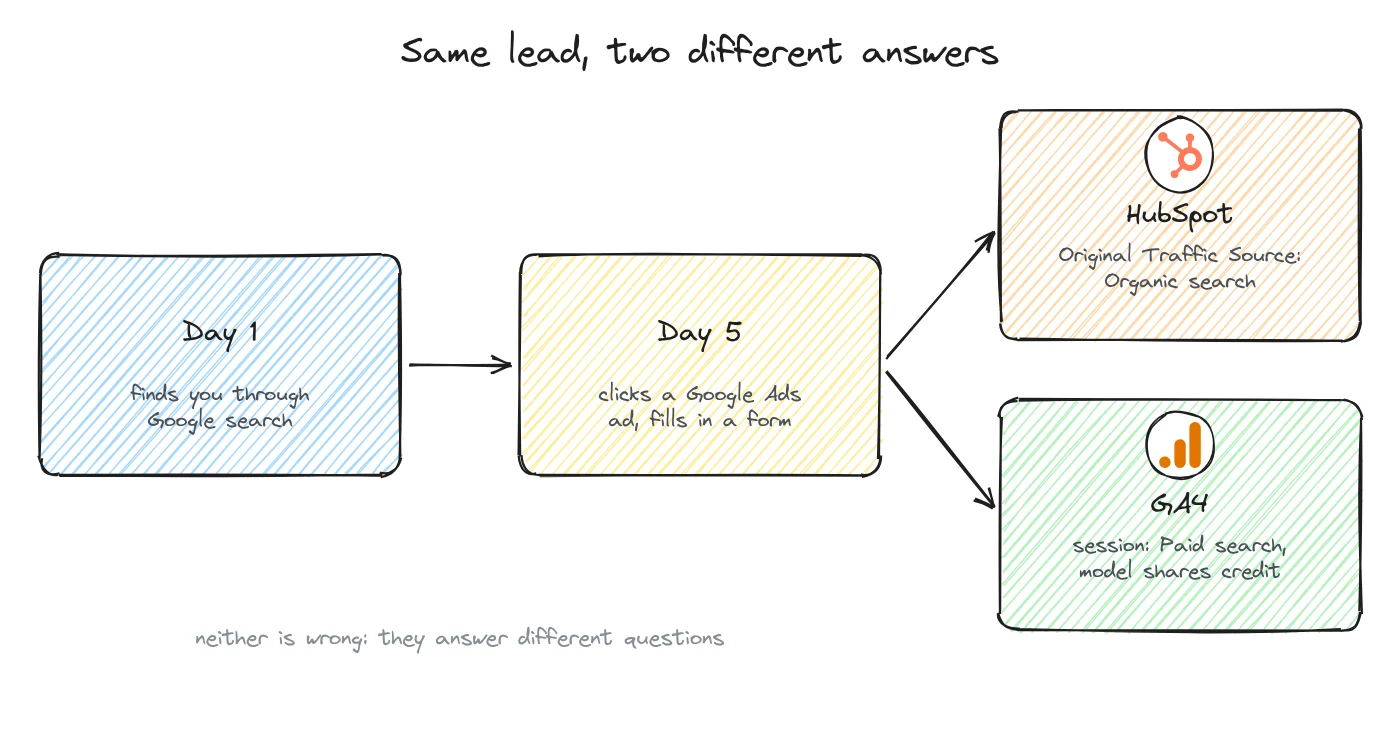
This comes up in almost every marketing meeting where both tools are open. The paid team says Google Ads drove the lead. The CRM says it was organic. Both are looking at real data, and neither tool is broken.
Why does HubSpot say one source and GA4 another?
Because they're built around different things. HubSpot is built around people: each contact has a source that describes how that person first found you, and how they most recently came back. GA4 is built around sessions and events: every visit gets its own source, and a conversion's credit is decided by an attribution model.
Take the lead in the diagram. On day 1 they find your blog through Google search and leave. On day 5 they click a Google Ads ad and fill in your form.
| HubSpot | GA4 | |
|---|---|---|
| What it stores | Original Traffic Source: Organic search. Latest Traffic Source: Paid search | Day 1 session: Organic Search. Day 5 session: Paid Search |
| Who gets the lead | The first known web source, Organic search | Shared by the attribution model across both visits, if GA4 can tie them to the same user |
| Unit | One contact | Sessions and key events |
HubSpot's own help page says the Original Traffic Source is "the first known web source through which a contact interacted with your business", and the Latest Traffic Source is the most recent one. When a visitor fills in a form, HubSpot connects them to their earlier tracked visits, which is how day 1 becomes the original source.
The other reasons the numbers don't match
Even on the same visits, the two tools count differently. HubSpot's help article on why HubSpot and Google Analytics don't match lists the main ones:
- Sessions end differently. Both end a session after 30 minutes of inactivity, but HubSpot also restarts sessions at midnight in your account's time zone and starts a new one when the traffic source changes. HubSpot says Google Analytics doesn't do either.
- Sources are measured differently. HubSpot measures a session by the referring domain, like google.com. Google Analytics uses source and medium, like google / organic.
- The channels have different names and rules. HubSpot puts Google Ads traffic into Paid search. GA4 can put it into Paid Search, Paid Video, Paid Social, Cross-network or Display, depending on the campaign.
- The tracking code isn't on the same pages. If one tool is missing from some landing pages, it never sees those first visits.
- Cookie banners and ad blockers. If someone declines cookies or blocks trackers, either tool can miss them, and HubSpot notes that ad blockers can affect its traffic source values.
- Internal traffic and bots. If the two tools filter different IP addresses or detect bots differently, the totals drift apart.
HubSpot's own advice is to compare trends between the two tools, not exact numbers. I agree. If both show organic growing month on month, that's the signal.
Which one should you trust?
Both, for different questions:
- Where do our leads and customers first come from? HubSpot. Original Traffic Source is tied to the contact and carries through to deals, so you can report on revenue by first touch.
- Which channels bring traffic and conversions, and how should we split budget? GA4, ideally next to the ad platforms. It sees every session, including the ones that never become a contact.
- What role did paid play for a specific lead? HubSpot's Latest Traffic Source, plus the UTM values captured in the form.
What doesn't work is putting the HubSpot number next to the GA4 number in the same slide and expecting them to match.
How to line them up
You won't make them identical, but you can make them tell the same story:
- Tag every campaign link with the same UTMs. Both tools read
utm_source,utm_mediumandutm_campaign, so consistent tagging is the biggest single fix. My UTM naming conventions guide has a simple scheme. - Save UTMs and click IDs on the contact. Hidden form fields store the campaign on the HubSpot record itself, as covered in capturing UTM parameters in forms.
- Make sure HubSpot actually sees the visit. Contacts created by imports, integrations or non HubSpot forms often end up as Offline sources. My guide on fixing HubSpot Offline Sources covers that.
- Track the same form submission in GA4. Then you can compare lead counts in both, as in tracking HubSpot form submissions in GA4.
- Match the basics. Same pages tagged, same internal IPs filtered, same domains in cross domain tracking.
If you need one answer for the board, join the two in a warehouse. HubSpot contacts and deals in BigQuery, with GA4 sessions and ad spend next to them, let you report first touch, last touch and revenue from the same tables. That's the setup in the HubSpot and BigQuery sales attribution case study, and it's what my marketing analytics consulting covers.
What about AI traffic?
Both tools now separate it, under different names. HubSpot has an AI Referrals source, with the AI platform's domain, such as chatgpt.com, in the drill down. GA4 has an AI Assistant channel. They're built separately and won't match exactly either. My guide on seeing ChatGPT and AI assistant traffic in GA4 explains GA4's side.
Frequently asked questions
Why does HubSpot say organic when GA4 says the lead came from paid?
HubSpot's Original Traffic Source keeps the first known web source for the contact, so a lead who first found you through search stays organic even if they later convert from an ad. GA4 reports the converting session's own source and shares credit across touchpoints.
Should HubSpot and GA4 numbers match?
No. HubSpot itself says they aren't expected to match exactly, because they define sessions and sources differently. Compare trends between the two tools rather than exact numbers.
Which source should I use to report on leads?
Use HubSpot's Original Traffic Source for where leads and deals first came from, and GA4 for channel performance and budget decisions. Save UTMs on every contact so you can see the campaign in both places.