How to track UTMs and conversions in GoHighLevel
By Motabar Javaid · · 6 min read · Updated
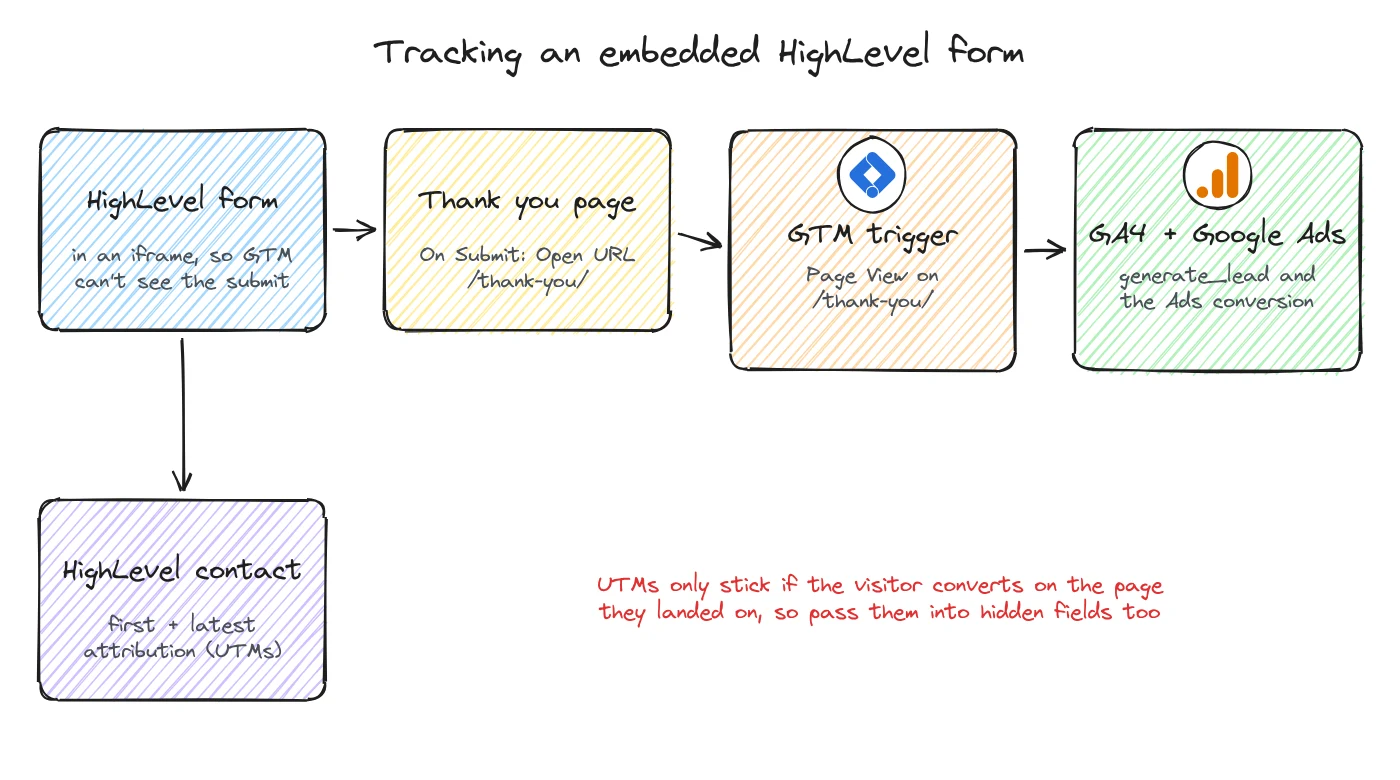
Short answer: HighLevel (GoHighLevel) forms, surveys and calendars usually load inside an iframe, so Google Tag Manager's normal form trigger never sees the submission. The most reliable fix is to send people to a thank you page after they submit and fire your GA4 and Google Ads conversion there. For source data, HighLevel already records a first and a latest attribution on every contact, including UTM parameters, as long as the visitor converts on a HighLevel form without leaving the page they landed on first.
GoHighLevel is popular with agencies because it does CRM, funnels, forms and booking in one place. Tracking is where it gets confusing, because some of that happens inside HighLevel and some happens in GA4 and your ad platforms, and they don't talk to each other by default.
Why doesn't GTM see GoHighLevel form submissions?
When a HighLevel form or calendar is embedded on your website, it loads in an iframe, which is a separate page from HighLevel sitting inside yours. GTM runs on your page, so it can't see clicks or submissions inside the iframe. The built in Form Submission trigger never fires, and a click trigger on the submit button fires even when the form fails validation.
That leaves two workable approaches.
Option 1: Redirect to a thank you page (most reliable)
In the form builder, open the form's options and change the On Submit action from the default thank you message to Open URL, then enter a thank you page on your own site, like /thank-you/.
Then in GTM:
- Create a Page View trigger where Page Path equals
/thank-you/. - Create a GA4 Event tag named
generate_lead, fired by that trigger. - Add your Google Ads conversion tag, and Meta Lead event if you use it, on the same trigger.
- Mark
generate_leadas a key event in GA4, as covered in my guide to setting up key events in GA4.
Two things to watch:
- Refreshes and bookmarks. Anyone who reloads or revisits the thank you page fires the event again. Counting the key event once per session in GA4 limits the damage.
- One thank you page per form type. If you have a contact form and a quote form, give each its own page, or add a parameter like
?form=quote, so you can tell them apart.
Calendars are the same idea. If your HighLevel calendar can redirect after booking, point it to a booking confirmation page and fire a book_call event there.
Option 2: Listen for messages from the iframe
Embedded widgets often send messages to the page they sit on, using a browser feature called postMessage. Several tracking specialists build GTM listeners on HighLevel's messages to catch submissions without a redirect.
The catch is that HighLevel doesn't document these messages, so their format can change without warning. Before relying on them, check what your form actually sends. Add this temporarily as a Custom HTML tag in GTM, submit a test entry, and look at the browser console:
<script>
  window.addEventListener('message', function (e) {
    console.log('message from', e.origin, e.data);
  });
</script>
If a message reliably arrives only after a successful submission, you can replace the console.log with a dataLayer.push that fires on that specific message, and check the origin matches the domain your forms load from. If nothing clear arrives, use the thank you page method instead.
The same pattern works for Calendly, where the messages are documented. My guide on tracking Calendly bookings in GA4 and Google Ads shows a complete listener.
How does GoHighLevel store UTM and source data?
HighLevel's help center describes two attribution records on every contact:
- First attribution: the session that first brought the contact in. It never changes.
- Latest attribution: the most recent tracked session before a conversion. It's overwritten each time they convert again.
You'll find both on the contact record, in the attribution section next to the activity feed. They include the UTM parameters, the referrer and the source HighLevel assigned.
HighLevel assigns sources using rules based on the URL and referrer. For example, its help docs say a utm_source containing adwords is classed as Google Ads, and one containing fb_ad as Facebook Ads. If your UTMs don't follow its expected values, leads can land in the wrong bucket, so it's worth agreeing a UTM naming convention that suits both GA4 and HighLevel.
Why are my GoHighLevel leads missing UTM data?
The usual causes, based on how HighLevel documents attribution:
- The visitor moved to another page before converting. HighLevel says UTM parameters are only recorded when the visitor completes the form, booking or chat without navigating to a different page first. Someone who lands on your homepage from an ad, then clicks through to the contact page, can arrive without UTMs.
- The form isn't a HighLevel form. Attribution comes from HighLevel's own forms, surveys, calendars, chat widget and order forms. Contacts created by other tools, for example through Zapier, are labelled as third party with no campaign detail.
- The lead came from a third party form on your site. HighLevel has an external tracking script for some outside forms, but which forms it supports has changed over time, so check HighLevel's current help docs before relying on it.
The fix for the first two is the same: capture UTMs on the landing page, store them, and pass them into hidden fields on the form. My guide on capturing UTM parameters in forms explains the approach, and it works with HighLevel forms too.
How do I get GoHighLevel conversions into Google Ads and Meta?
The thank you page method above sends the lead conversion from the browser. That's a good start, but the bigger win is telling the ad platforms which leads became customers.
HighLevel pipelines already track that: a lead moves to "booked", "showed" or "won". Sending those stages back to Google Ads and Meta as offline conversions lets bidding optimise for real customers, not just form fills. For that you need the click ID, like gclid or fbclid, saved with each lead. I explain the full setup in sending CRM sales back to Google Ads and Meta.
How to test it
- Open a private window with a tagged link, like
?utm_source=test&utm_medium=test&utm_campaign=ghl_test. - Submit the form on the page you landed on.
- In GTM Preview mode, confirm your conversion tags fired once on the thank you page.
- In HighLevel, open the new contact and check the attribution shows your test UTMs.
- Delete the test contact.
If you want this set up and tested across your forms, calendars and ad platforms, it's part of my Google Tag Manager implementation work.
Frequently asked questions
Can Google Tag Manager track GoHighLevel form submissions?
Not with the built in form trigger, because embedded HighLevel forms load in an iframe. Redirect the form to a thank you page and fire your tags there, or build a listener for the iframe's messages after checking what your form actually sends.
Where does GoHighLevel store UTM parameters?
On each contact, in the first attribution and latest attribution records. First attribution keeps the original source. Latest attribution updates each time the contact converts again.
Why does GoHighLevel show leads as third party or with no source?
Usually because the contact wasn't created by a HighLevel form, for example through Zapier, or because the visitor browsed to another page before converting and the UTMs weren't carried over. Store UTMs on landing and pass them into hidden form fields.