How to capture UTM parameters in your forms (and keep the first touch)
By Motabar Javaid · · 4 min read · Updated
Short answer: Add hidden fields to your form for utm_source, utm_medium, utm_campaign, utm_term, utm_content and click IDs like gclid and fbclid. On the visitor's landing page, read those values from the URL and store them in a first party cookie or local storage, because they disappear from the URL as soon as the visitor clicks to another page. When the form loads, fill the hidden fields from storage. Each lead then arrives in your CRM with its marketing source attached.
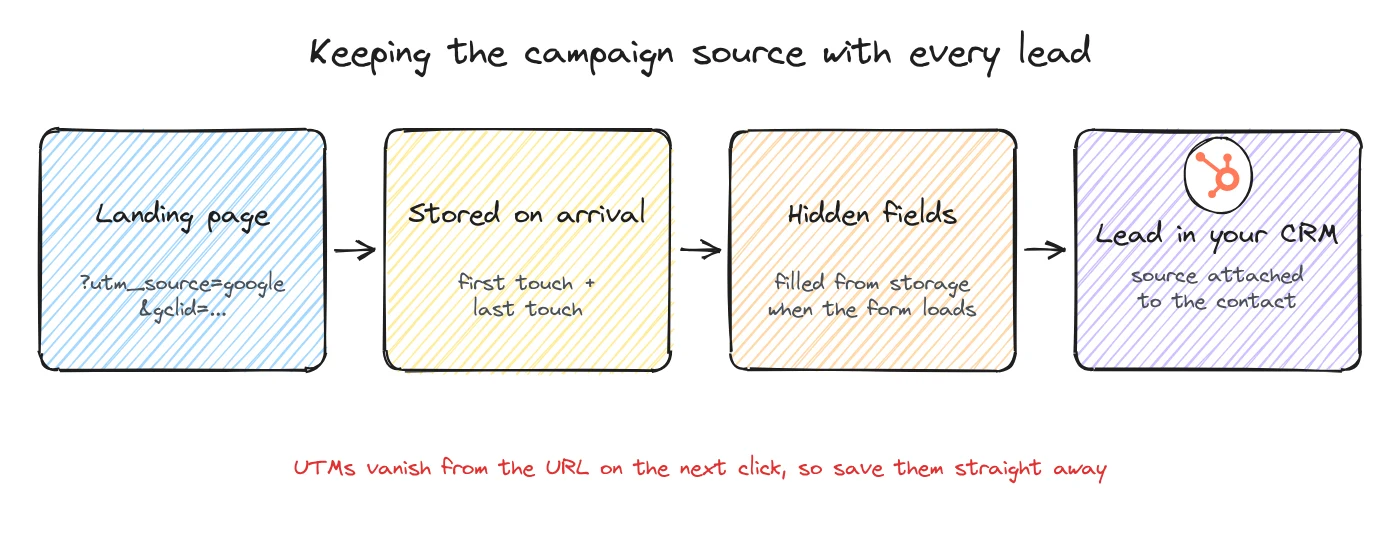
This is the single most useful fix for "we don't know where our leads come from". GA4 knows where sessions come from. Your CRM needs to know where people came from.
Why the URL isn't enough
Most visitors don't fill in the form on the page they landed on. They land on a blog post from your ad, read your pricing page, then contact you. By the time they're on the contact page, the UTMs are long gone from the address bar. That's why you need to store them on the first page.
First touch, last touch, or both?
- First touch: the source that first brought this person to you. Great for knowing which channels find new customers.
- Last touch: the source of the visit when they converted. Great for knowing what closes.
Store both if you can, in separate fields like first_utm_source and last_utm_source. If you only store one, make it first touch, because it's the one that's otherwise hardest to recover.
The script
Add this to every page, through Tag Manager or your site's footer. It saves first touch values once and updates last touch on every visit that has campaign data:
(function () {
  var keys = ['utm_source', 'utm_medium', 'utm_campaign', 'utm_term', 'utm_content', 'gclid', 'fbclid'];
  var params = new URLSearchParams(window.location.search);
  var current = {};
  keys.forEach(function (k) { if (params.get(k)) current[k] = params.get(k); });

  try {
    if (Object.keys(current).length) {
      current.landing_page = window.location.pathname;
      if (!localStorage.getItem('first_touch')) {
        localStorage.setItem('first_touch', JSON.stringify(current));
      }
      localStorage.setItem('last_touch', JSON.stringify(current));
    }
  } catch (e) { /* storage blocked: nothing saved */ }
})();
Then, on pages with a form, fill the hidden fields:
(function () {
  function fill(prefix, data) {
    Object.keys(data).forEach(function (k) {
      var field = document.querySelector('input[name="' + prefix + k + '"]');
      if (field && !field.value) field.value = data[k];
    });
  }
  try {
    fill('first_', JSON.parse(localStorage.getItem('first_touch') || '{}'));
    fill('last_', JSON.parse(localStorage.getItem('last_touch') || '{}'));
  } catch (e) {}
})();
Name your hidden fields to match, like first_utm_source and last_utm_campaign. Forms that load late, like embedded HubSpot or Typeform forms, need the fill step to run after the form appears. Most form tools have a "form ready" callback for this.
Map the fields in your CRM
- Create matching properties in your CRM, like HubSpot, Salesforce or GoHighLevel.
- Map each hidden field to its property in the form settings or your integration.
- If a tool like Zapier or Make sits in between, map every field there too. Unmapped fields are silently dropped.
- Protect first touch from being overwritten. Only write first touch fields when they're empty, or a second form submission months later replaces the original source.
My guide on HubSpot showing Offline Sources covers the HubSpot specific side of this, and tracking UTMs in GoHighLevel covers HighLevel. If leads book a call instead of filling in a form, see tracking Calendly bookings in GA4 and Google Ads.
Consent and privacy
Storing campaign parameters is a form of tracking. If your cookie banner requires consent for marketing storage, only run the script after the visitor accepts. That means some leads will arrive without source data, which is expected.
Test it
- Open a private window with a tagged link, like
?utm_source=test&utm_medium=test&utm_campaign=form_test. - Click to a different page, then submit the form.
- Check the new contact in your CRM. Every field should be filled.
Clean UTMs make this far more useful, so pair it with a proper UTM naming convention. Once leads carry their source, you can send closed deals back to your ad platforms, which is covered in offline conversion imports. If you want this built and connected for you, that's part of my marketing analytics consulting.
Frequently asked questions
Why are my UTM hidden fields empty?
Usually because the visitor didn't submit the form on the page they landed on, and the UTMs weren't stored when they arrived. Save them on the landing page and fill the fields from storage.
Should I store first touch or last touch UTMs?
Both if you can. If you only store one, store first touch, because it's the hardest to recover later.
Do I need consent to store UTM parameters?
It depends on your local privacy rules and how you store them. If your banner requires consent for marketing storage, only save UTMs after the visitor accepts.