How to deduplicate Meta Pixel and Conversions API events
By Motabar Javaid · · 5 min read · Updated
Short answer: When you send the same conversion from both the Meta Pixel (browser) and the Conversions API (server), Meta needs a way to know it's one event, not two. Give both versions the same event name and the same event_id, and Meta keeps one and drops the duplicate. Without a matching event_id, every purchase can be counted twice, which inflates your reported ROAS and confuses Meta's bidding.
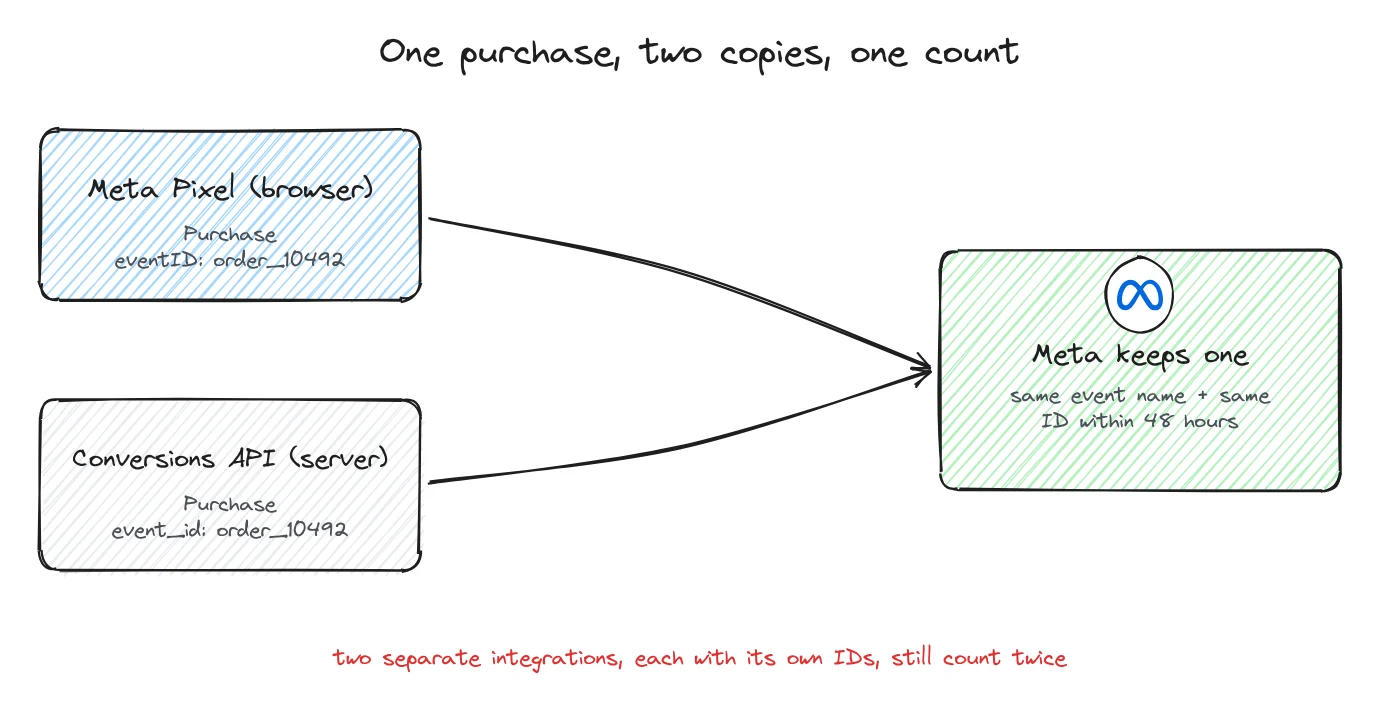
Running Pixel and Conversions API together is Meta's recommended setup. It only works if deduplication is right, and in my audits it often isn't.
Why send both?
- The Pixel runs in the browser. It sees things like clicks and page context, but ad blockers and browser privacy features block it for some visitors.
- The Conversions API sends events from your server, so it isn't affected by ad blockers, but it relies on you sending good customer data for matching.
Together, they catch more conversions than either alone. The catch is that most conversions now arrive twice.
How deduplication works
Meta treats a browser event and a server event as the same conversion when:
- The event name matches, for example
Purchasefrom both, and - The
event_idmatches. In the Pixel it's passed aseventID. In the Conversions API it's theevent_idfield.
Meta deduplicates matching events received within 48 hours of each other. If both arrive within about five minutes, Meta keeps the browser version.
Meta's best practices also allow a fallback: if you can't share an event_id, send the same external_id (your own customer ID) and fbp (the Meta browser cookie) on both sides. The shared event_id is still the cleaner option.
How to set the event_id
The ID must be generated once and shared by both sides. Good options:
- For purchases: use the order ID, like
order_10492. It's unique, and both the browser and your server already know it. - For leads: generate a unique ID when the form is submitted, push it to the data layer, and send the same value from the browser tag and the server.
With server side Google Tag Manager, the usual setup is: the web container generates or reads the ID, sends it with the event to your server container, and the server container's Conversions API tag forwards the same ID. Both Meta tags then share it.
Common mistakes
- Generating the ID twice. If the browser and server each create their own random ID, they never match.
- Different event names.
Purchasefrom the Pixel andpurchaseorCompletePaymentfrom the server won't deduplicate. - More than one integration sending the same event. Deduplication can't fix this one. See the next section.
event_timesent in milliseconds. Meta expectsevent_timeas a Unix timestamp in seconds, and it can be up to 7 days in the past. JavaScript'sDate.now()returns milliseconds, a 13 digit number, so server events built with it carry a nonsense time. UseMath.floor(Date.now() / 1000)instead. For offline events Meta's docs go further: one event older than 7 days makes it reject the whole request.- Missing customer data on server events. Deduplication works, but server only conversions match poorly to people, because no email, phone or
fbp/fbcvalues were sent.
Why am I getting duplicates from more than one integration?
Deduplication only works between events that share an event_id. It does nothing when two separate setups each send their own Pixel and Conversions API events with their own IDs. Meta sees two different purchases.
This happens a lot on ecommerce stores:
- A platform app plus GTM. Meta's app for Shopify, or a WooCommerce plugin, often sends both Pixel and Conversions API events by itself. Add your own Pixel in Google Tag Manager on top and every purchase now arrives from two sources.
- A platform app plus your own server side setup. Same problem, one layer down. The app's server events and your server GTM container's events carry different IDs.
- Leftover code from an old agency or theme. A hardcoded Pixel in the theme, plus a newer setup, plus a plugin.
How to find them:
- In Events Manager, check which integrations are sending each event. More than one partner integration, or a partner integration plus a manual setup, is a red flag.
- Install the Meta Pixel Helper browser extension and load your thank you page. More than one Pixel ID, or the same event firing twice, confirms it.
- Pick one owner for each event. Either let the app handle Pixel and Conversions API together, or switch the app's tracking off and run everything through your own setup.
The same trap catches GA4 on Shopify, as I explain in Shopify custom pixels explained.
How to check it's working
- In Events Manager, open your dataset and look at an event like Purchase.
- Check that events are received from both Browser and Server.
- Look at the deduplication details. Meta shows whether browser and server events are being matched.
- Use Test Events while making a test purchase. You should see both versions arrive and one marked as deduplicated.
Also compare Meta's purchase count with your real orders for the same days, using a click only attribution view. If Meta reports close to double your orders, deduplication is failing.
Improve match quality too
Event Match Quality in Events Manager scores how well Meta can tie your server events to real people. Send hashed email and phone where you have consent, plus the fbp and fbc cookies, the visitor's IP address and user agent. Better matching means more conversions attributed and better bidding.
If you're still deciding whether to go server side, start with is server side tracking worth it. For why Meta and GA4 still won't match even after this, read why Meta, Google Ads and GA4 conversions don't match. If you'd like it set up properly, that's my server side tracking setup service.
Frequently asked questions
Why is Meta counting my purchases twice?
Usually because the Pixel and the Conversions API both send the purchase without the same event_id, so Meta can't tell they're the same conversion.
What should I use as the event_id for Meta?
For purchases, the order ID works well because both the browser and server know it. For leads, generate one unique ID at submission and share it with both sides.
How long does Meta wait to deduplicate events?
Meta deduplicates matching browser and server events received within 48 hours of each other. If both arrive within about five minutes, it keeps the browser event.