How to send CRM sales back to Google Ads and Meta (offline conversions)
By Motabar Javaid · · 4 min read · Updated
Short answer: Offline conversion imports send events from your CRM, like qualified leads and closed deals, back to Google Ads and Meta, matched to the ad click that started them. For Google Ads, you match on the gclid captured with the lead, or on hashed email through Enhanced Conversions for leads. For Meta, you send CRM events through the Conversions API with hashed customer data. Once set up, the platforms can optimise toward people who actually buy, not just people who fill in forms.
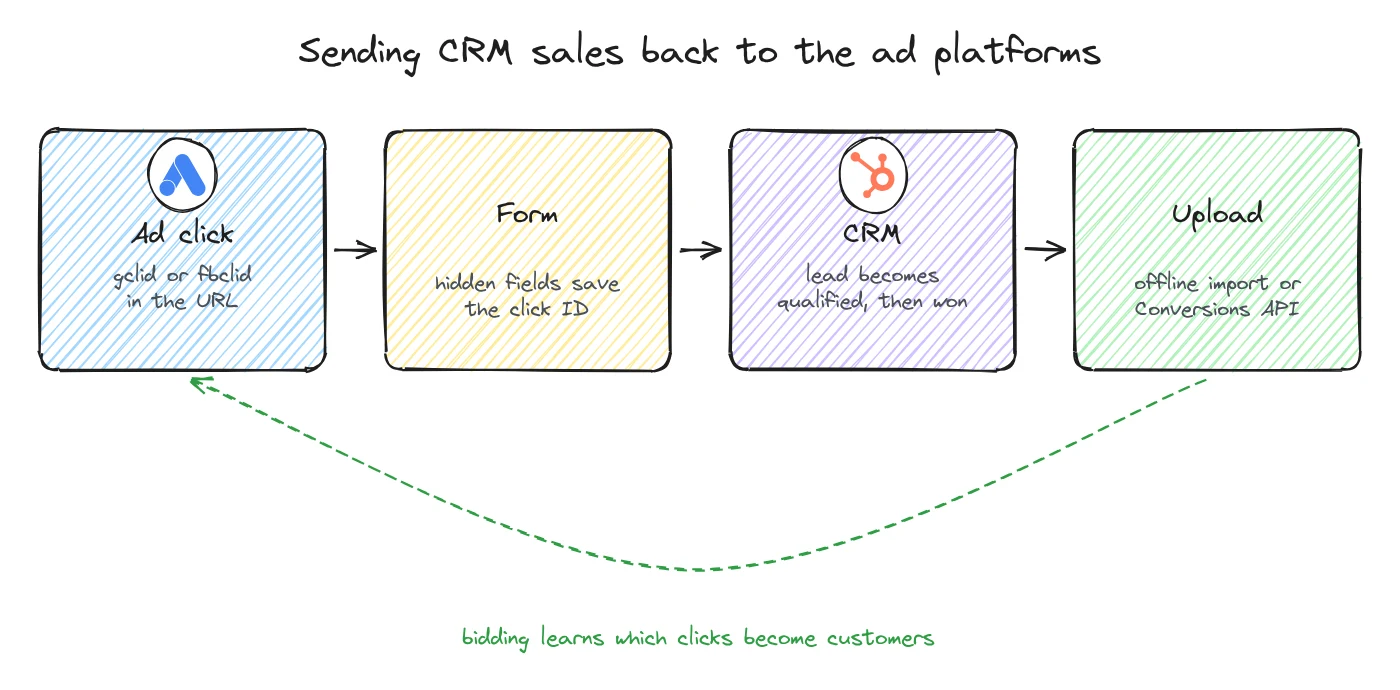
For any business where the sale happens after the form, like B2B, high ticket services or anything with a sales call, this is often the biggest single improvement to ad performance.
The problem it solves
Without it, Google and Meta only see the form submission. Their bidding learns to find people who fill in forms, including students, competitors and people who never answer the phone. Your cost per lead looks great. Your cost per customer doesn't.
When the platforms also see which leads became customers, and how much they were worth, they can learn the difference.
Step 1: Capture the click data with every lead
Everything depends on this. Each lead in your CRM needs:
- The
gclidfrom Google Ads clicks, andfbclidfrom Meta clicks, saved in hidden form fields. My guide on capturing UTM parameters in forms includes click IDs. - The email address and phone number, which the platforms can match on in hashed form.
- The date and time of the original lead.
Step 2: Decide which stages to send
Pick one to three stages that mean real progress, for example:
- Qualified lead (sales accepted it)
- Opportunity or meeting held
- Closed won, with the deal value
Sending a value with closed deals lets value based bidding favour bigger customers.
Google Ads options
- Native CRM integrations. HubSpot and Salesforce can connect to Google Ads and send lifecycle stages as conversions. This is the easiest route if you use them.
- Enhanced Conversions for leads. Capture hashed email on the website form, then upload conversions from your CRM using the same hashed email. Google matches them up. It's Google's recommended method now, and it doesn't depend on the
gclidsurviving. My guide on Enhanced Conversions covers the website side. - Uploads by
gclid. Upload a file or use the API with thegclid, conversion name, time and value. Conversions must be uploaded within 90 days of the click.
Create a dedicated conversion action for each stage in Google Ads, with the source set to import.
Meta options
Meta handles offline and CRM events through the Conversions API:
- Send a
Lead, a custom qualified lead event, orPurchasewhen the CRM stage changes. - Include hashed email and phone, plus
fbc(built from thefbclid) where available, to match it to the person. - Use the CRM's own integration, a tool like Zapier or Make, or a server side setup to send it.
Matching quality depends on the customer data you send, so check Event Match Quality in Events Manager.
Step 3: Tell bidding what matters
- Set the deeper stage, like qualified lead or closed deal, as a primary conversion in Google Ads once you have enough volume.
- Keep the form submission as a secondary conversion for reporting.
- In Meta, optimise campaigns toward the CRM event when volume allows.
If your volume is low, optimise for qualified leads rather than closed deals. The platforms need a steady number of conversions to learn from.
Common pitfalls
- No click ID stored. If the
gclidwasn't captured at lead time, Google can only match on hashed customer data. - Stages sent twice. Re-syncing the same deal creates duplicate conversions. Use unique order or deal IDs.
- Uploading too late. Google Ads ignores conversions uploaded more than 90 days after the click.
- Mismatched time zones between your CRM and ad accounts.
This is the kind of loop behind the HubSpot and BigQuery sales attribution case study, where sales could finally see which campaigns produced real pipeline. If you want it set up, that's part of my marketing analytics consulting.
Frequently asked questions
What are offline conversions in Google Ads?
They're conversions that happen outside your website, like a closed deal in your CRM, uploaded to Google Ads and matched to the original ad click.
How long do I have to upload offline conversions to Google Ads?
Conversions matched by click ID must be uploaded within 90 days of the ad click.
Can Meta use CRM data for optimisation?
Yes. Send CRM events through the Conversions API with hashed customer data, and you can optimise campaigns toward them once you have enough volume.