How to set up key events in GA4 the right way
By Motabar Javaid · · 4 min read · Updated
Short answer: In GA4, a key event is any event you mark as important to your business, like a purchase, a lead form or a booked call. You mark it under Admin, Data display, Key events, or by toggling an event in the Events list. The hard part isn't the toggle. It's picking the few events that genuinely mean money, making sure each one fires exactly once, and importing the right ones into Google Ads.
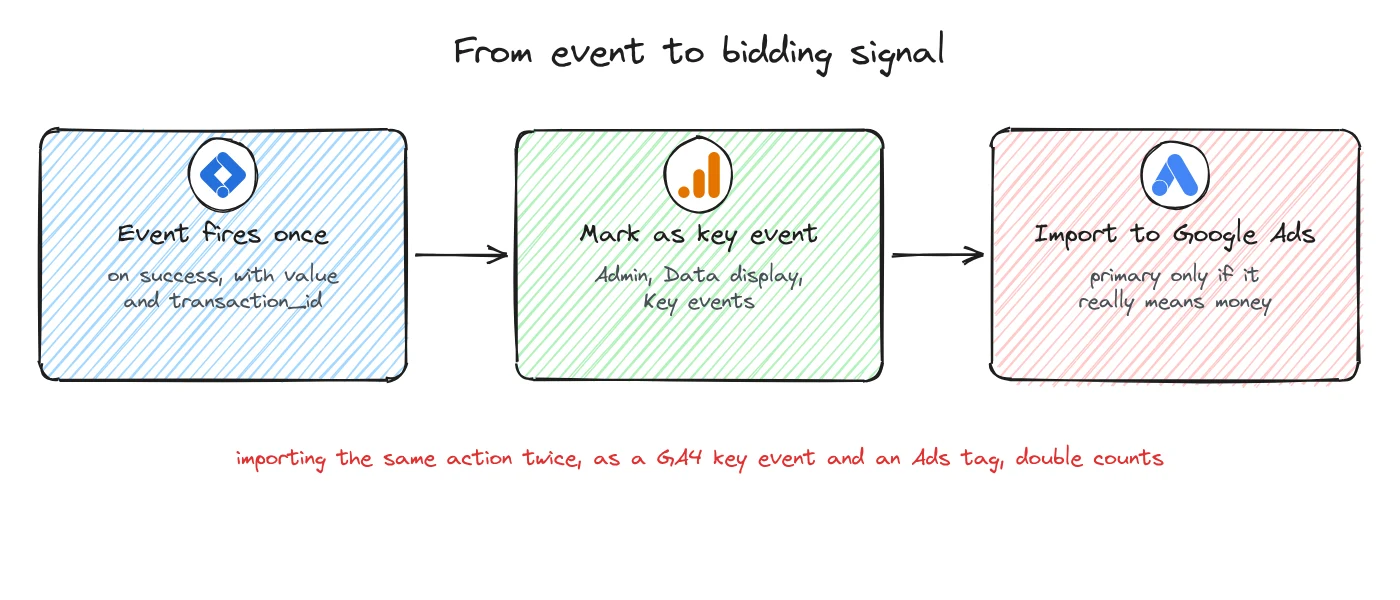
Google renamed GA4 "conversions" to "key events" in 2024. Inside Google Ads they're still called conversions, which confuses almost everyone. Same idea, two names.
Step 1: Decide what actually counts
Most messy GA4 setups have too many key events. Scroll depth, video plays and file downloads end up marked as conversions, and suddenly the conversion rate looks great while revenue doesn't move.
A good rule: if your sales team or finance would care that it happened, it's a key event. If not, it's a normal event.
Typical key events:
- Ecommerce:
purchase - Lead generation:
generate_lead(form submitted), plusbook_callor similar for calendar bookings (here's how to track Calendly bookings). Phone and WhatsApp clicks can count too, with care: see tracking WhatsApp, phone and email clicks - SaaS:
sign_upand, if you track it, trial to paid
Use Google's recommended event names where one fits, like purchase, generate_lead and sign_up. GA4 understands them, and they make reports easier to read.
Step 2: Make sure the event fires once, at the right moment
This is where most setups break. Check that:
- It fires on success, not on the button click. A click on "Submit" also fires when the form fails validation. Fire it on the thank you page, or on a confirmed success message pushed to the data layer. On WordPress, that means tracking the form plugin's success event.
- It doesn't fire again on a page refresh. Thank you page events are famous for this. For purchases, always send a
transaction_idso GA4 can drop duplicates. - Purchases include value and currency. Without
valueandcurrency, GA4 counts the sale but reports no revenue.
The GA4 DebugView (Admin, DebugView) shows events arriving in real time while you test. Submit your own form and watch it land once.
Step 3: Mark it as a key event
You have two options:
- The event already exists: go to Admin, Data display, Events, and toggle Mark as key event.
- The event doesn't exist yet: go to Admin, Data display, Key events, click New key event, and type the exact event name. It starts counting as soon as an event with that name arrives.
If you only have a page_view on a thank you page, you can build a new event from it under Admin, Data display, Events, Create event. Set a condition like event_name equals page_view and page_location contains /thank-you, and name the new event generate_lead.
Step 4: Choose the counting method
GA4 lets you count a key event once per event or once per session. For purchases, count every one. For leads, once per session usually makes more sense, because one person submitting your form twice in a visit is still one lead.
Step 5: Import into Google Ads
If you run Google Ads, link it to GA4 under Admin, Product links, Google Ads links. Then in Google Ads, go to Goals, Conversions, and import the GA4 key events you want to bid on.
Two things to watch:
- Don't import the same action twice. If you already have a Google Ads conversion tag for purchases, importing the GA4 purchase as well double counts. Pick one as the primary action and set the other to secondary.
- Only import what you want bidding to optimise toward. Smart Bidding chases whatever you tell it is a conversion. Import a cheap micro event and it will happily find you more of those.
A quick health check
Once a week for the first month, compare your key event counts with your real orders or CRM leads. They won't match exactly, because consent banners and ad blockers hide some visitors, but they should be close and move together. If GA4 is ever higher than your real numbers, you're double counting.
For the bigger picture on why the platforms never agree, see why Meta, Google Ads and GA4 conversions don't match. If you want someone to set this up properly, that's exactly what my GA4 audit and repair service does.
Frequently asked questions
Is a key event the same as a conversion?
Yes. Google renamed conversions to key events in GA4 in 2024. In Google Ads they're still called conversions, and you can import GA4 key events into Google Ads as conversions.
How many key events should I have in GA4?
Usually between one and five. Only mark events that represent real business value, like purchases, leads or bookings. Too many key events make your conversion rate meaningless.
Why isn't my new key event showing data?
Standard reports can take 24 to 48 hours to update. Check DebugView or the Realtime report first. If the event shows there, it's working and the reports will catch up.