How to track Calendly bookings in GA4 and Google Ads
By Motabar Javaid · · 6 min read · Updated
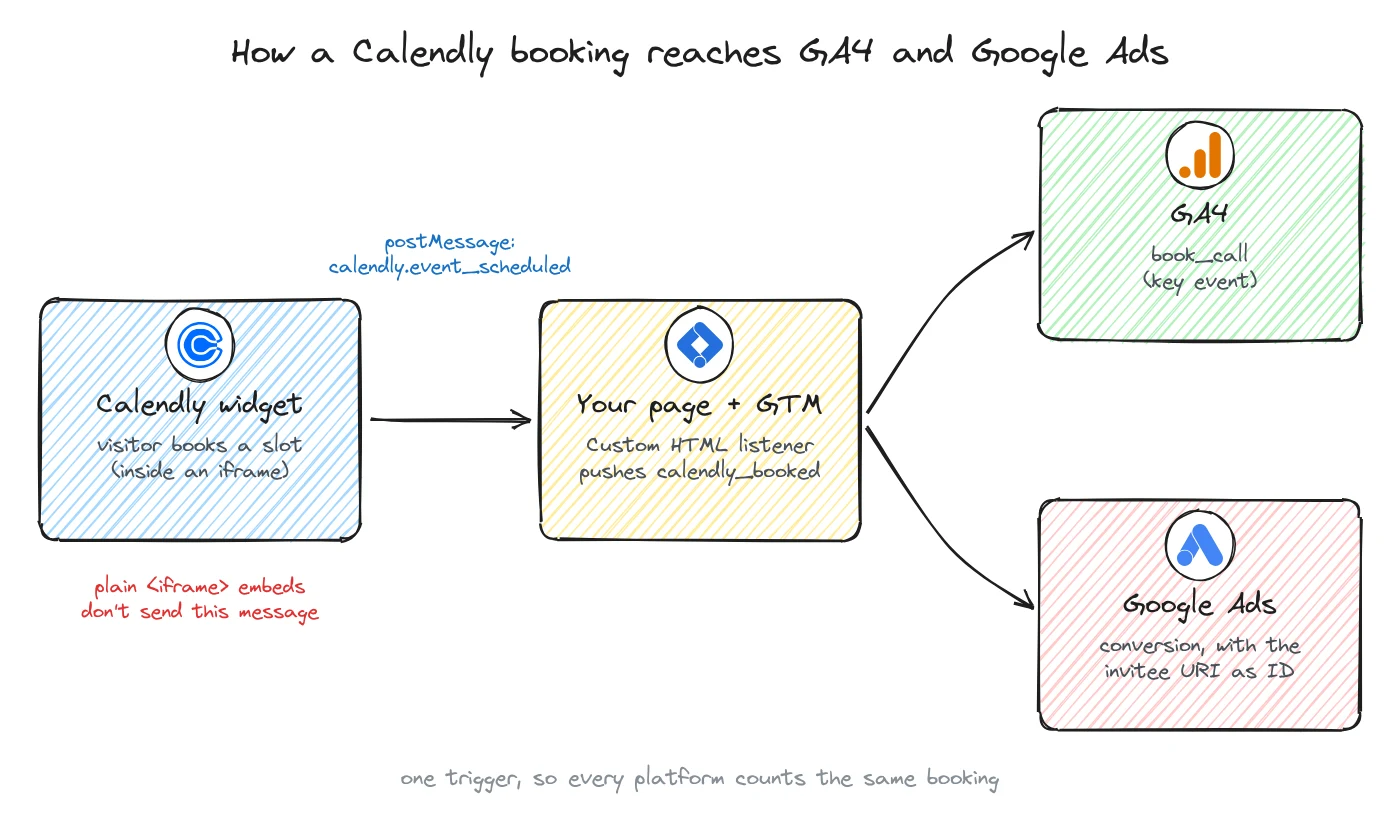
Short answer: When Calendly is embedded on your site with its JavaScript widget, it sends a calendly.event_scheduled message to your page every time someone books. Listen for that message in Google Tag Manager, push it into the data layer, and use it to fire a GA4 event and a Google Ads conversion. Mark the GA4 event as a key event and you're counting booked calls, not clicks on a "Book a call" button.
For a lot of service businesses, the booked call is the conversion. Yet most of the accounts I audit either don't track it at all, or count clicks on the booking button, which tells you nothing about who actually picked a time.
Why doesn't GTM see Calendly bookings on its own?
Calendly's booking page runs inside an iframe, which is a separate web page from calendly.com sitting inside yours. Your GTM container can't see clicks or form submissions inside it, so normal click and form triggers never fire on the booking itself.
The good news is that Calendly built a way around this. The embedded page uses window.postMessage(), a standard browser feature for passing messages between frames, to tell your page what's happening in the booking flow. You just need something on your page listening for it.
Which Calendly events can you track?
According to Calendly's developer documentation, the embed sends these messages to the parent page:
| Message | When it fires | Useful for |
|---|---|---|
calendly.profile_page_viewed |
Your Calendly profile page loads | Rarely needed |
calendly.event_type_viewed |
A specific event type loads | Start of the booking funnel |
calendly.date_and_time_selected |
The visitor picks a slot | Funnel step |
calendly.event_scheduled |
The booking is confirmed | Your conversion |
calendly.page_height |
The inline widget changes height | Ignore it |
The calendly.event_scheduled payload contains two links: the URI of the scheduled event and the URI of the invitee. It doesn't contain the person's name, email or the meeting time. That matters later for Enhanced Conversions.
One catch from Calendly's own help docs: a plain <iframe> embed doesn't support these messages. You need the Calendly embed script (inline widget, popup widget or popup text), which is what the embed code in Calendly gives you by default.
Option 1: Calendly's built in GA4 integration
Calendly has a native Google Analytics integration. You add your GA4 Measurement ID under Integrations and apps, and Calendly sends events like invitee_meeting_scheduled to your property. Calendly then suggests marking that event as a key event.
It's quick, but I rarely rely on it on its own:
- The events are sent from Calendly's page, not yours, so they can end up detached from the visit that brought the person to your site. That makes the traffic source behind each booking less reliable.
- Calendly allows one GA4 Measurement ID per organization, which gets awkward for agencies or teams with several sites.
- Calendly says it doesn't integrate directly with Google Tag Manager, so you can't use it to fire Google Ads, Meta or LinkedIn tags.
If you just want a rough booking count in GA4, it's fine. If you're running paid ads and want bidding to optimise toward booked calls, use option 2.
Option 2: The postMessage listener in GTM (what I recommend)
This keeps the conversion on your own page, inside the same GA4 session as the ad click.
Step 1: Add the listener as a Custom HTML tag
In GTM, create a Custom HTML tag with this code, and fire it on the pages where Calendly is embedded (or All Pages if the popup widget appears site wide):
<script>
  window.addEventListener('message', function (e) {
    if (e.origin !== 'https://calendly.com') return;
    if (!e.data || e.data.event !== 'calendly.event_scheduled') return;
    var invitee = e.data.payload && e.data.payload.invitee;
    window.dataLayer = window.dataLayer || [];
    window.dataLayer.push({
      event: 'calendly_booked',
      calendly_invitee_uri: invitee ? invitee.uri : undefined
    });
  });
</script>
The origin check makes sure you only react to messages that really came from Calendly. If you also want funnel steps, you can push calendly.event_type_viewed and calendly.date_and_time_selected the same way.
If the data layer is new to you, my guide on what a data layer is explains why this approach is more reliable than scraping the page.
Step 2: Create the trigger and variable
- Trigger: a Custom Event trigger with the event name
calendly_booked. - Variable: a Data Layer Variable called
calendly_invitee_uri.
Step 3: Send the GA4 event
Create a Google Analytics: GA4 Event tag, fired by the calendly_booked trigger. Name the event something clear like book_call. Then mark book_call as a key event in GA4, as covered in my guide to setting up key events in GA4.
Step 4: Send the Google Ads conversion
Create a conversion action in Google Ads for booked calls, then add a Google Ads Conversion Tracking tag in GTM with its Conversion ID and Label, fired by the same trigger. Put the calendly_invitee_uri variable in the Transaction ID field. Every booking has a unique invitee URI, so Google Ads can ignore duplicates if the tag fires twice.
Alternatively, import the GA4 book_call key event into Google Ads. Just don't do both and set both as primary, or every booking counts twice.
What about Enhanced Conversions?
Enhanced Conversions match conversions to Google accounts using a hashed email address. The Calendly message doesn't include the invitee's email, so the browser side tag has nothing to send.
If you need better matching, use the invitee data from Calendly's webhooks or API and send it to Google Ads server side, or upload booked and closed calls as offline conversions. I cover that in sending CRM sales back to Google Ads and Meta. Background on the feature itself is in my Enhanced Conversions guide.
How do you keep the UTM source with each booking?
Calendly records the five standard UTM parameters (utm_source, utm_medium, utm_campaign, utm_content, utm_term) when they're on the scheduling link, and returns them in its webhook and API data. Custom parameters like gclid aren't supported.
So if you want the source stored against each meeting in Calendly or your CRM, pass your page's UTMs into the embed URL. The same first touch logic from my guide on capturing UTM parameters in forms applies.
How to test it
- Open GTM Preview mode and load the page with your Calendly embed.
- Book a real test slot.
- In Tag Assistant, you should see a
calendly_bookedevent with the invitee URI, and your GA4 and Google Ads tags should fire once. - Check GA4 DebugView for
book_call, then cancel the test booking in Calendly.
If nothing shows up, the usual cause is a plain iframe embed, or the listener tag not firing on that page. My guide to debugging GTM with Preview mode walks through it.
If you'd rather have this set up and tested end to end, it's a standard part of my Google Tag Manager implementation work.
Frequently asked questions
Can I track Calendly bookings in GA4 without Google Tag Manager?
Yes. Calendly's built in GA4 integration sends an invitee_meeting_scheduled event to your property. You can also add the same postMessage listener with gtag() calls in your site code. GTM just makes it easier to send the booking to several platforms.
Why isn't the calendly.event_scheduled event firing?
Usually the page uses a plain iframe embed instead of the Calendly embed script, and only the script sends these messages. Also check that your listener tag fires on that page and that the origin check matches https://calendly.com.
Should I count Calendly bookings or "Book a call" button clicks as conversions?
Count bookings. A click only shows interest, and many people who click never pick a time. Bidding toward clicks teaches Google Ads to find more clickers, not more calls.