How to track WhatsApp, phone and email clicks as conversions in GA4 and Google Ads
By Motabar Javaid · · 6 min read · Updated
Short answer: In Google Tag Manager, create Click triggers for links that start with tel:, mailto: or point to wa.me and api.whatsapp.com, and send a GA4 event for each, like click_phone, click_email and click_whatsapp. You can mark them as key events and import them into Google Ads. But a click isn't a call or a message, so in most accounts these should be secondary conversions. If phone calls are your main lead source, track real calls with Google's call reporting or a call tracking tool instead.
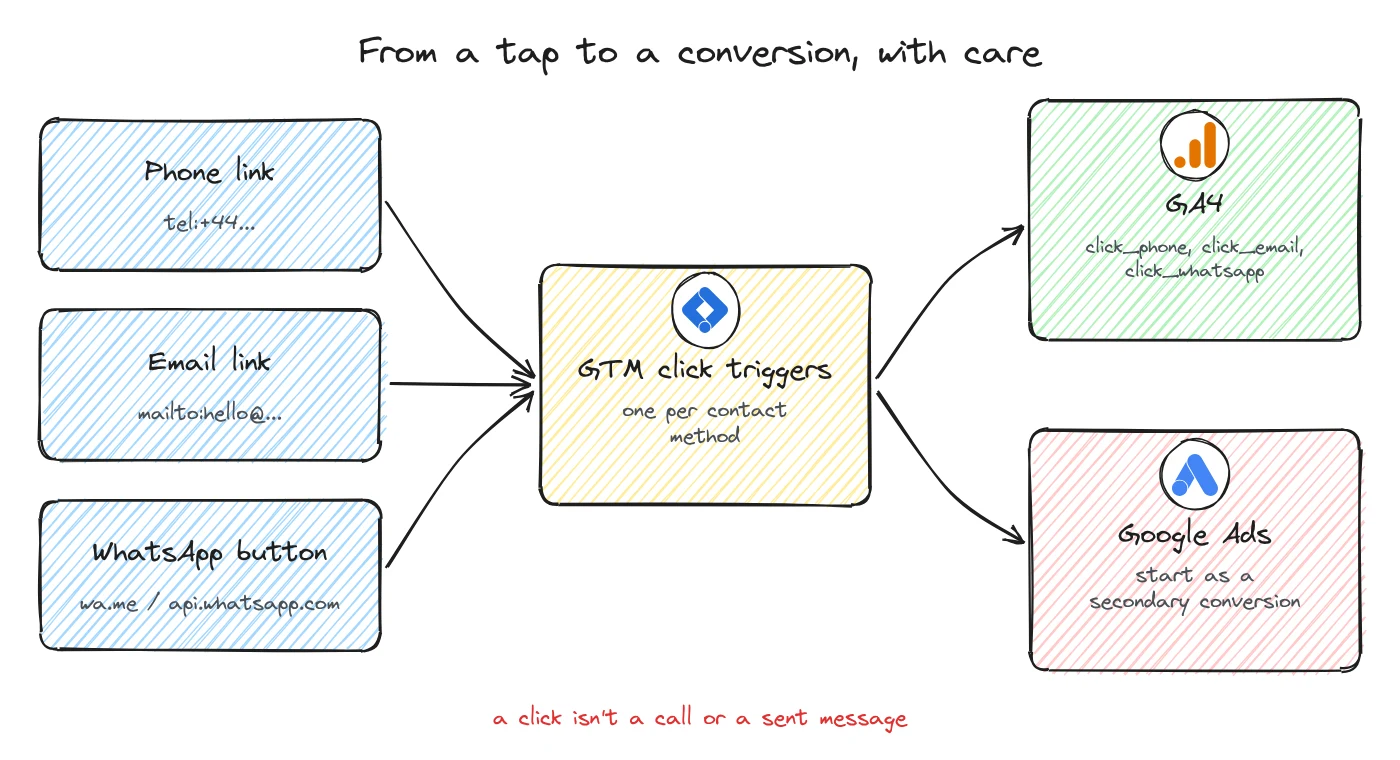
For local businesses, clinics, trades and a lot of service companies, most enquiries never touch a form. People tap the phone number, open WhatsApp or click the email address. If you don't track those, your ads look like they produce nothing.
How do I track phone, email and WhatsApp clicks with GTM?
These are all just links with a special address, so one set of triggers covers every page of your site.
Step 1: Turn on the Click URL variable
In GTM, go to Variables, Configure and tick Click URL under Clicks. The triggers below read it.
Step 2: Create one trigger per contact method
Use the trigger type Click, Just Links, set to fire on Some Link Clicks:
| Contact method | Condition |
|---|---|
| Phone | Click URL starts with tel: |
Click URL starts with mailto: |
|
| Click URL matches RegEx (pattern below) |
For WhatsApp, use this pattern:
wa\.me|api\.whatsapp\.com|^whatsapp:
It covers the common link formats: https://wa.me/447..., https://api.whatsapp.com/send?phone=... and the app link whatsapp://send?.... If your WhatsApp button comes from a plugin, click it in Preview mode and check which URL it uses.
Step 3: Send a GA4 event for each
Create a GA4 Event tag for each trigger:
click_phone, fired by the phone triggerclick_email, fired by the email triggerclick_whatsapp, fired by the WhatsApp trigger
Add link_url as a parameter with the value {{Click URL}}. If you show more than one number, for example sales and support, you'll be able to tell which one people used. Register link_url as a custom dimension in GA4 if you want to see it in reports.
Keeping three separate events, rather than one generic "contact" event, lets you decide later which ones deserve to be key events.
Step 4: Check GA4's own click tracking
GA4's enhanced measurement can record outbound clicks on its own. Sources disagree on whether it picks up tel: and mailto: links, and WhatsApp links will usually show as outbound clicks to another domain. Check your property in DebugView. Either way, keep your own named events as the ones you report on and mark as key events, so nothing gets counted twice.
Should phone and WhatsApp clicks count as conversions?
This is the question that matters, and the honest answer is "sometimes".
A click only tells you someone tapped a link. It doesn't tell you:
- Whether the call happened. On desktop, a
tel:link might open a calling app nobody uses, or nothing at all. - Whether a WhatsApp message was sent. The click opens WhatsApp. The person can close it without typing.
- Whether it was an accidental tap. Sticky "Call now" buttons on mobile get tapped by thumbs scrolling past.
- Whether it was a customer at all. Existing clients click your number to chase an invoice, and suppliers click your email.
So treat them like this:
| Situation | How to use click conversions |
|---|---|
| Clicks are a small share of your leads | Track them in GA4, but keep them out of Google Ads bidding |
| Clicks are a big share of leads, nothing better available | Import to Google Ads as secondary conversions first, compare with real enquiries for a few weeks |
| Phone calls are your main lead source | Track actual calls with call reporting or a call tracking tool, and use those for bidding |
In GA4, count these key events once per session. Someone who taps the number three times because the call didn't connect is still one enquiry. My guide to setting up key events in GA4 explains the counting options.
What are the Google Ads options for phone calls?
Google Ads offers several phone call conversion types. Two matter for your website:
- Clicks on your number on your mobile website. Google's help page is clear that this only tracks clicks on the number, not actual calls. It's the same idea as the GA4 event above, set up with the Google Ads tag.
- Calls to a phone number on your website. Google swaps your number for a Google forwarding number for visitors who came from an ad. Then it can count real calls and only record a conversion when the call lasts longer than a minimum length you set. Forwarding numbers aren't available in every country, so check your account.
If calls drive your business, option 2, or a dedicated call tracking tool, is far more useful for bidding than any click event. You can also import GA4's click_phone instead of option 1, but don't use both for the same action, or every tap counts twice.
Do I need consent to track these clicks?
The clicks go through your normal GA4 and Google Ads tags, so the same consent rules apply as for any other event. If your banner needs consent for analytics or ads, these events follow it. My guide on Consent Mode v2: basic vs advanced covers how that works.
How to test it
- Open GTM Preview mode on a page with your phone number, email and WhatsApp button.
- Click each one. The phone and email links may try to open an app; just close it.
- In Tag Assistant, check that each click fired the right GA4 tag, once, with the correct
link_url. - In GA4 DebugView, confirm
click_phone,click_emailandclick_whatsapparrive.
If a WhatsApp click doesn't fire, the button might not be a normal link. Some plugins open WhatsApp with JavaScript. In that case, use a Click, All Elements trigger on the button instead. My guide to debugging GTM tags walks through finding the right element.
How do I know which clicks became customers?
GA4 and Google Ads can only see the click. To learn which ones turned into paying customers, the enquiry has to land somewhere you can track, like a CRM, with its source attached. That's easier with forms, which is one good reason to offer a form next to the phone and WhatsApp buttons. My guides on capturing UTM parameters in forms and sending CRM sales back to Google Ads and Meta cover the rest of that loop.
If you'd like this set up across your site and ad accounts, it's part of my Google Tag Manager implementation work.
Frequently asked questions
How do I track WhatsApp button clicks in GA4?
In Google Tag Manager, create a Click trigger for links whose URL contains wa.me or api.whatsapp.com, and send a GA4 event like click_whatsapp. If your button opens WhatsApp with JavaScript instead of a link, trigger on the button element instead.
Should I use phone number clicks as a Google Ads conversion?
Only carefully. A click doesn't mean a call happened, so start with phone clicks as a secondary conversion and compare them with real enquiries. If calls are your main lead source, use Google's call tracking with forwarding numbers, which can count real calls above a minimum length.
Why does GA4 show phone clicks but I'm not getting calls?
Clicks include accidental taps, desktop clicks that open nothing, and existing customers. Count the event once per session, check where the clicks happen, and compare with your real call log before trusting the number.